The Complete Guide to Preventing Open Source Malware
Prevent open source malware with Latio’s complete guide, including checklists and a Claude Code plugin.

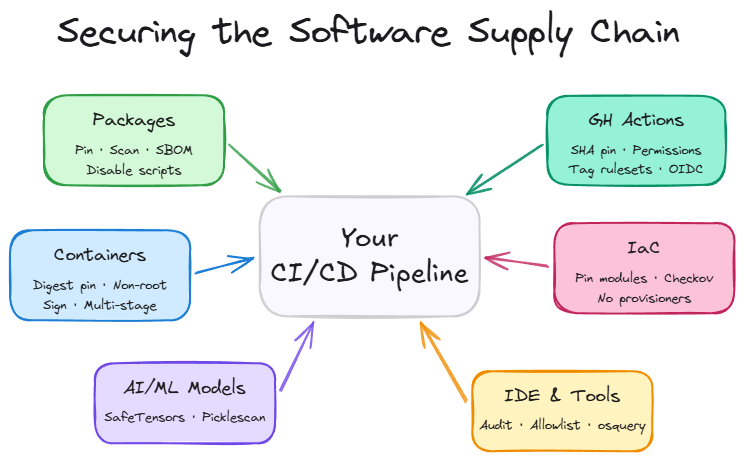
It’s clear open source malware can no longer be overlooked. Last year, Sonatype cataloged over 877,000 known malicious packages across npm, PyPI, Maven, and other registries. This year, the number of packages being pushed to open source repositories has increased to over 100,000 a day, overwhelming scanners and researchers trying to keep up with the amount of malware being distributed. Most recently, the TeamPCP incidents, beginning with the Trivy takeover, showed how unprepared teams are to respond.
Security teams are prioritizing the structure of their application security programs around vulnerabilities, ignoring the impact, reach, and unique risks malware introduces. This creates a clear path to risk blind spots because CVE scanning doesn't catch active exploits. Image scanning doesn't catch compromised build pipelines, and most teams don’t audit their GitHub Actions, Terraform modules, VS Code extensions, or ML models. The attack surface is larger than most teams realize.
This guide provides teams with everything they need to understand and respond to open source malware:
- Six checklists to prevent malware across third-party packages, container images, Github actions, IaC modules, and AI models.
- A Claude Code plugin to automate your discovery and remediation of these issues across your codebase.
- An overview of common attack types per exploit category
- A maturity matrix to assess your program’s readiness
- Relevant OSS, freemium, and paid tools
- Helpful resources for further reading
How the Checklists Work
The below six checklists provide suggestions for immediate and long-term strategies for preventing open source malware in an organization's environment. The “Immediate Action” sections indicate high priority items that drastically reduce your attack surface. The “Long-term Initiatives” sections are larger engineering projects that are best practices for defense-in-depth initiatives. These checklists are also available as a Claude Code plugin. Just install the plugin and run /audit-supply-chain and it will identify and fix immediate issues, while providing walkthroughs for more complicated ones, alongside a complete report on the repo.
By starting with the checklists and Claude Code plugin, teams can take immediate action to safeguard their CI/CD pipelines from ongoing attacks. The longer term strategies provide what’s needed to mature your security program with defense in depth measures to validate the code that runs on your systems.
Checklist for Third-Party Packages
Many teams scan their third party packages for vulnerabilities, but often miss the preventative steps required to block malicious code from getting installed during updates. This checklist starts with steps to reduce your attack surface, and moves to active validation and prevention measures.
Immediate Actions
- Pin all dependencies to specific versions - example: requests==2.31.0 instead of requests>=2.0.0
- Require a package cooldown period on your builds, pnpm security docs as an example
- Disable pre-install and post-install scripts in your package manager - different package managers have different equivalents. Malware is commonly deployed during package installation.
Larger Initiatives
- Review every new dependency addition for health in PRs before merging - Snyk Advisor
- Deploy a malware scanner locally and in CI/CD that blocks on detection - Aikido SafeChain, GuardDog
- Enable namespace/scope restrictions to prevent dependency confusion - Artifactory,· Cloudsmith
- Enforce allow-lists for approved packages
- Verify package signatures before deploy - Sigstore
- Generate SBOMs for your dependency tree - CycloneDX, Syft
- Run packages in sandboxed install environments to detect install-time behavior - StepSecurity, or other eBPF/CADR sensors.
Checklist for Container Images
Container images are not as commonly exploited as third party packages, but the underlying risk exposure is similar. This checklist provides teams steps to go from proper version pinning to total image signing and validation before deployment.
Immediate Actions
- Audit your images, ensure you're using official or verified base images only - Docker Scout, Grype
- Pin base images by digest, not just tag (FROM node:18@sha256:...). Renovate and Dependabot can do this automatically.
- Stop running containers as root - Hadolint
- Scan images for known vulnerabilities - Grype, Docker Scout
Larger Initiatives
- Implement image signing and verification to prevent tampering - Cosign
- Set up admission controllers to block unsigned or unscanned images - Kyverno
- Scan images continuously in the registry, not just at build time - Harbor, Dockle
- Automate weekly rebuilds of base images
- Switch to minimal base images, and/or use multi-step builds - Alpine, Distroless
- Build images in hermetic, reproducible environments
- Generate and attach SBOMs and SLSA provenance attestations to every image - SLSA, in-toto
Checklist for GitHub Actions
Github actions are commonly misconfigured in public repos, allowing attackers to inject code via their own branches. This checklist provides teams guidance on preventing these attacks, as well as how to monitor them in the future.
Immediate Actions
- Pin all Actions to full commit SHAs (not tags or branches) - pin-github-action
- Set permissions: explicitly in every workflow to least-privilege
- Use CODEOWNERS to require review on .github/workflows/ changes
- Audit which third-party Actions you're currently using, and scan them for issues like pull_request_target triggers - Zizmor
- Enable tag protection rules - create a ruleset to prevent forced tag releases
- Don’t allow untrusted input to AI tools in pipeline - ensure that input from Github issues or other public sources doesn’t run in combination with AI review tools.
Larger Initiatives
- Enable GitHub's Action allow-list to restrict which Actions can run
- Monitor network egress and filesystem activity in workflows - StepSecurity Harden Runner, or other eBPF sensor.
- Use OpenSSF Scorecard to evaluate Action trustworthiness - OpenSSF Scorecard
- Implement OIDC for cloud deployments instead of long-lived secrets
- Separate CI and CD workflows with environment-based approvals
- Enforce SHA pinning at the org level via GitHub policy
- Run self-hosted runners in ephemeral, isolated environments
- Build internal Action mirrors for critical dependencies
- Set up automated Action version updates - Dependabot, Renovate
Checklist for Infrastructure-as-Code Modules
Infrastructure as code is an underexplored attack vector in open source malware, as gaining initial access is more challenging for attackers. A few basic actions can vastly improve your posture.
Immediate Actions
- Pin Terraform modules and providers to exact versions - version = "5.1.2" instead of version = ">= 3.0.0"
- Use only modules from the official verified registry or your org's private registry
- Run IaC scanning for misconfigurations - Checkov, tflint
Larger Initiatives
- Implement Terraform state encryption and access controls
- Use OPA/Sentinel policies to enforce guardrails (no public S3 buckets, no wildcard IAM, etc.) - Sentinel, OPA
- Enable drift detection to catch out-of-band changes - Spacelift, env0
- Lock down local-exec and external provisioners and Run all IaC applies through audited CI runners - Atlantis, Terraform Cloud
- Require signed commits for IaC repos
- Build internal module libraries with security-reviewed defaults
- Continuously reconcile running infrastructure against declared state - Crossplane, Firefly
Checklist for AI/ML Models
This checklist applies to teams building or using open source models rather than third party providers like Anthropic or OpenAI. Numerous supply chain attacks target these ecosystems, as standards are less rigidly enforced.
Immediate Actions
- Never load untrusted pickle files
- Prefer safer serialization formats over pickle/PyTorch native - SafeTensors, ONNX
- Only pull models from verified organizations on Hugging Face - Hugging Face Hub
- Document which models your team uses and where they come from
Larger Initiatives
- Run Picklescan on all PyTorch models before loading - Picklescan, ModelScan
- Host models in a private registry with access controls
- Verify model hashes against known-good checksums
- Implement model cards and provenance documentation
- Run all model loading in sandboxed environments with no network access
- Implement model signing and verification
- Conduct adversarial testing to detect poisoned models
- Maintain an internal model registry with security review gates
- Monitor AI systems at runtime to spot malicious behavior
Checklist for IDE Extensions and Developer Tools
This checklist targets protecting developer endpoints, which frequently run third party code in browser and VSCode extensions. Endpoint management tools are needed to audit what’s running across developer machines.
Immediate Actions
- Audit currently installed extensions across your team - VS Code Marketplace, Santa, OSQuery
- Only install extensions from verified publishers with meaningful install counts - Wiz: VS Code Supply Chain Risk
- Remove unused extensions
- Review extension permissions before installing (network access, filesystem access)
- Give developer training on extension usage and risks
Larger Initiatives
- Publish an org-approved extension allowlist
- Use VS Code Profiles to standardize extensions across teams - VS Code Profiles
- Restrict VS Code Marketplace access via enterprise policy
- Have a plan to rotate secrets that live on developer workstations
- Run dev environments in remote containers or cloud-based environments - GitHub Codespaces, Gitpod, Dev Containers
- Implement network segmentation for developer workstations
- Monitor extension behavior at the endpoint level
- Use ephemeral dev environments that reset between sessions
Examples of Open Source Malware Attacks
Third-Party Packages (npm, PyPI, Maven, Go, RubyGems)
This is the highest-volume attack surface, as public registries have little to no gatekeeping on who can publish what. Most developers don’t inspect the code of open source packages they’re importing into their code, and most organizations don’t follow a stringent approval process for adding new libraries. Additionally, trusted packages can become less well maintained over time, increasing the tech debt and attack surface over time.
Example Attacks:
Typosquatting. Publishing packages with names one character off from popular libraries (reqeusts instead of requests, lodashs instead of lodash). Threat actors now use AI to mass-generate look-alike package names and obfuscate payloads to bypass signature-based scanners. The malicious packages mirror the real API, so developers don't notice the mistake immediately. Install scripts run when npm install or pip install executes.
Dependency confusion. Targeting organizations that use internal package names that are guessable or leaked by creating higher version public packages. Most package managers prefer the public, higher-versioned package over the internal one. Blog on prevention in NPM.
Starjacking. Open source registries don't verify that a package's linked GitHub repo actually belongs to the publisher. Attackers link their malicious packages to high-star Github repos to appear to be the legitimate package. This one is easy to miss if searching public registries instead of Github itself.
Malicious install scripts & lifecycle hooks. This is the actual payload delivery mechanism for most open source malware attacks. npm preinstall/postinstall scripts, Python setup.py with arbitrary code, Maven plugins that execute during build phases. Whether the attacker gets their package installed via typosquatting, confusion, social engineering, or a leaked credential, installing the package executes the script that steals credentials.
Maintainer account takeover. Compromising an existing, trusted maintainer's credentials or PAT and pushing a malicious update to a legitimate, widely-used package. This can lead to directly pushing a malicious package upstream, sneaking in malicious code in a fake commit, or publishing malicious actions.
Container Images
Container images from Docker Hub and other public registries carry a similar risk profile, but require different mitigations. With container images, teams are pulling a much larger attack surface than a single package, and they’re harder to scan for smuggled malicious code than Github directly. Because most teams don’t enforce what’s allowed in their images, it can be easy to overlook a package that was smuggled in.
How attacks work:
Poisoned base images. Attackers publish images with names similar to official ones (ngnix vs nginx) or compromise less-maintained "community" images.
Embedded malware in layers. Container images are built in layers, and malicious content can be hidden in intermediate layers that aren't obvious when inspecting the final image. A RUN curl | sh buried in a multi-stage build is easy to miss. Because layers are cached and shared, the malicious content persists across rebuilds that don't change that specific layer. Additionally, many teams don’t baseline image behavior, making it easy to miss when malicious actions take place during build.
Registry credential theft. The GhostAction attack in September 2025 exfiltrated 3,325 secrets from 817 repos. Stolen registry credentials allow attackers to push compromised images to legitimate repos without anyone noticing until runtime.
Tag mutability. FROM node:18 doesn't mean you'll get the same image every time. Tags are mutable, meaning that the image behind the tag can be changed. Without pinning by digest (@sha256:...), your build is pulling whatever was last pushed to that tag. This is similar to the Github actions attacks - images need to be pinned to full SHAs.
GitHub Actions
This is the attack category that continues to explode across Github, and it's the one most teams are still underestimating. GitHub Actions run with access to your repository secrets, GITHUB_TOKEN, deployment credentials, and whatever else is in the workflow environment. Supply chain attacks targeting GitHub Actions have increased significantly in 2026.
How attacks work:
Action compromise/tag mutation. The tj-actions/changed-files incident was a widespread example of this vector, where attackers compromised a dependency action (reviewdog/action-setup), which cascaded up to tj-actions. The injected payload dumped CI runner memory, exposing secrets from every repo using the action. The attack exploited the fact that GitHub Action tags are mutable, @v3 was pointed to a malicious commit - this is why Github actions need to be pinned to specific SHAs.
Typosquatting action organizations. Orca researchers demonstrated this attack vector by registering 14 GitHub organizations with misspelled names of popular Action owners such as circelci, actons, google-github-actons. There's no verification system preventing this. A workflow with a typo in uses: silently runs the attacker's code.
Script injection. Actions that use ${{ github.event }} context in run: blocks are vulnerable to injection. An attacker crafts a PR title or commit message containing shell commands that execute in your workflow. This gives arbitrary code execution without needing to compromise any Action.
Overpermissive workflow tokens. Actions running with permissions: write-all or default broad GITHUB_TOKEN scopes give compromised actions far more access than they need. Combined with any of the above vectors, overly permissive tokens amplify the blast radius dramatically.
Cascading dependency chains. GitHub Actions can depend on other Actions. The tj-actions compromise originated from reviewdog/action-setup, a transitive dependency most users didn't know they were pulling in. There's no built-in dependency graph for Actions, making this invisible for most teams.
AI tools with untrusted sources. Aikido researchers demonstrated an attack with AI pipeline tools taking input from untrusted sources, such as reading Github issues to prioritize them. Researchers were able to prompt inject these tools via issues to uncover secrets.
Infrastructure-as-Code Modules (Terraform, Helm, Pulumi, CloudFormation)
IaC modules are a distinct attack surface because they execute with infrastructure-level permissions. A malicious Terraform module can provision resources in your cloud account, modify IAM policies, or open network paths.
How attacks work:
Malicious Terraform modules. The Terraform Registry has the same lack of gatekeeping as npm. At NDC Oslo 2025, researchers gave a live demonstration of supply chain attacks on the Terraform Registry. HashiCorp acknowledges that "Terraform providers and modules used in configurations will have full access to variables and Terraform state" and cannot prevent malicious modules from exfiltrating sensitive data.
local-exec and provisioner abuse. Terraform modules can use local-exec provisioners to execute arbitrary commands in the CI environment, or use the HTTP provider to exfiltrate values from state. State files often contain database passwords, API keys, and other secrets that persist across runs.
AI/ML Models (Hugging Face, Model Hubs, PyTorch)
This is the fastest-growing attack surface, and the one where security tooling is least mature. Loading a serialized ML model can execute arbitrary code and many data science teams aren't thinking about this as a security risk.
How attacks work:
Pickle deserialization attacks. Python's pickle module is the default serialization format for many ML frameworks. Pickle allows arbitrary Python code execution during deserialization. Loading a malicious .pkl or PyTorch model file can drop a reverse shell, exfiltrate data, or install persistent backdoors. In February 2025, ReversingLabs discovered two malicious ML models on Hugging Face using this exact technique.
The "NullifAI" evasion. Several security scanners exist to detect malicious actions in compressed modules; however, these have been bypassed using a combination of different compression algorithms, as well as various bypasses for picklescan.
Model poisoning. Beyond outright malware, attackers can subtly modify model weights to introduce backdoors. The model can perform normally during certain activities, but be triggered later to take malicious actions.
IDE Extensions and Developer Tools (VS Code, JetBrains, etc.)
IDE extensions run with full local filesystem and network access on developer workstations, which often hold SSH keys, cloud credentials, and package registry tokens.
How attacks work:
Malicious extension publishing. The "prettier-vscode-plus" attack in November 2025 delivered a multi-stage malware chain through the official VS Code Marketplace, deploying the Anivia loader followed by OctoRAT (a full remote access trojan). Extension marketplaces are not typically scanned by security vendors or maintainers.
Leaked publisher access tokens. Wiz Research identified over 100 cases of secret leakage by VS Code extension publishers, including leaked Personal Access Tokens (PATs) that grant the ability to push extension updates. A leaked Marketplace PAT allows an attacker to distribute malicious updates across the entire install base, one case had over 150,000 cumulative installs exposed.
Extension dependency attacks. VS Code extensions can depend on other extensions and npm packages. A compromised dependency can inject malicious code into an otherwise legitimate extension update, mirroring the cascading dependency problem in GitHub Actions.
Fork/recommended extension attacks. VS Code forks (like Cursor, VSCodium) recommend extensions from the Open VSX registry, which has even fewer security controls than the official Marketplace. Researchers demonstrated that missing extensions in Open VSX could be typosquatted to target users of these forks.
Conclusion
Preventing open source malware is hard but necessary work. The attack surface continues to expand, and many teams are not prepared for zero day responses to these kinds of attacks. Teams should take immediate action to make sure they’re secured by implementing the relevant guardrails.
CVEs and malware are different problems with different mitigations, and conflating them is how you build a program that feels comprehensive but leaves the actual attack surface wide open. Start with the "Do Right Now" items. Pin your versions, audit your Actions, stop loading untrusted pickle files. The harder controls (sandboxed installs, SLSA provenance, ephemeral runners) take longer, but the easy ones eliminate a significant chunk of your exposure today
Appendix:
Maturity Matrix
This maturity matrix maps security practices to levels of maturity in order to quantify your organization’s supply chain security resilience to open source malware attacks. This can be an effective tool for teams looking to track their improvement over time and manage longer term initiatives.
OWASP SAMM alignment: The Secure Build practice's "Software Dependencies" stream maps directly to this matrix. Level 1 = create records and opportunistically analyze. Level 2 = evaluate dependencies and ensure timely reaction. Level 3 = analyze dependencies for security issues in a comparable way to your own code.
Third-Party Packages
Container Images
GitHub Actions
Infrastructure-as-Code Modules
AI/ML Models
IDE Extensions and Developer Tools
Frameworks and Standards Reference
These frameworks provide maturity models for a supply chain security program. If you're mapping to compliance requirements, this is where to start.
Supply Chain Security Tools Reference
Open source and paid options for each subcategory.
Third-Party Packages
Malware Scanners/Blockers
Package Registries and Proxies
SBOM Generation
Provenance and Signing
Application Supply Chain Zero Day Prevention
There are other preventative tools out there, but there are the ones that baseline library behavior some way and can prevent it.
Container Images
Image Scanners
Image Signing and Verification
Admission Controllers
Container Registries
Minimal Base Images
Dockerfile Linting
GitHub Actions
Actions Security and Analysis
Dependency Update Automation
Infrastructure-as-Code
IaC Scanners
Policy Engines
IaC Platforms
AI/ML Models
Model Scanners
Safe Serialization
AI Security Platforms
IDE Extensions and Developer Tools
Extension Auditing and Management
Remote/Ephemeral Dev Environments
Further Reading and Resources
Standards and Frameworks:
- OWASP SAMM: Software Assurance Maturity Model
- OWASP SPVS: Software Package Verification Standard
- SLSA - Supply-chain Levels for Software Artifacts
- in-toto - Framework for supply chain integrity
- OpenSSF Scorecard - Automated security health checks
Attack Research and Incident Reports:
- Unit42: tj-actions Supply Chain Attack - Deep dive into the March 2025 incident and cascading dependency compromise
- ReversingLabs: Malicious ML Models on Hugging Face - NullifAI evasion technique analysis
- JFrog: PickleScan Zero-Days - Three bypasses in the primary ML model security scanner
- Wiz: VS Code Extension Supply Chain Risk - Leaked PATs exposing 150K+ installs
- BoostSecurity: Terraform Registry Vulnerabilities - How trusted modules can be hijacked
- GitGuardian: Typosquatting and Dependency Confusion - Primer on the two most common package attacks
- Trail of Bits: Supply Chain Attacks Exploiting Assumptions - Why our mental models of trust are broken
- Gradle Blog: Detecting Maven-Hijack Risks - Build tool dependency resolution exploitation
Guides and Best Practices:
- Wiz: GitHub Actions Security Guide - Comprehensive walkthrough of Actions attack vectors and hardening
- Sonatype: Open Source Malware Index - Quarterly data on the scale of the problem
- Socket: 2025 Mid-Year Threat Report - Malicious package landscape analysis